CapBypass – Captcha Scanner: Automated CAPTCHA solving for power users
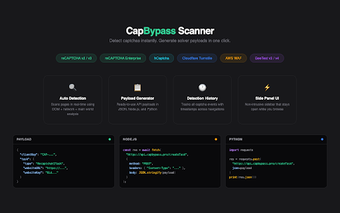
CapBypass – Captcha Scanner, from CapBypass, automates identification and solving of web CAPTCHAs to reduce manual verification during browsing and testing. The extension focuses on handling modern verification types by supporting reCAPTCHA v2, v3 and Enterprise, hCaptcha, FunCaptcha, GeeTest and image-based challenges. Installation is simple and configuration usually requires only a CapBypass API key, so it fits developers, data analysts and automation users who face frequent CAPTCHAs and need repeatable browser-based solving.
What workflows is CapBypass meant to remove friction from?
CapBypass integrates with the CapBypass API service to offload challenge solving for repetitive tasks such as web scraping, automated testing and high-volume browsing. The extension detects CAPTCHA prompts on active pages and forwards them to the service's solving infrastructure, returning answers to the page so the session can continue without manual clicks. That arrangement suits scripted sessions that encounter frequent verification hurdles.
How does the extension behave under normal browsing load?
The extension reports low-latency response times and a lightweight design that does not significantly affect normal browser performance, according to developer notes. It runs inside Chromium-based browsers, so users on Chrome, Edge, Brave and Opera see the same runtime environment. Those characteristics keep the solving step from becoming a major source of local CPU or memory pressure in routine use.
What are the authentication and service mechanics?
Using the extension requires a valid CapBypass account and an API key to authenticate requests with the external solver. The extension exposes real-time status updates and balance monitoring in its interface so users can track requests. It is reported to work on the vast majority of sites that use supported CAPTCHA providers, reflecting its intended integration with server-side solving infrastructure.
How configurable is the extension for automation setups?
Settings let users toggle solving for specific CAPTCHA providers, which helps tailor behavior in mixed workflows. The interface needs minimal setup beyond the API key, making it practical to add to automation toolchains where hands-off solving is required. Users who orchestrate scraping or testing scripts can enable only the providers they need and monitor request flow from the extension panel.
CapBypass suits repeatable automation but is focused on a specific user profile
CapBypass is a practical option for developers, data analysts and automation users who need predictable handling of frequent CAPTCHAs, backed by a dedicated solving service and positive niche reception. The trade-off is dependence on an external solver and account-based authentication, so casual or occasional web users are unlikely to see the same value. For scripted tasks, it delivers a targeted, dependable aid.